When the PS5 turns on, the companion appears over the screen: your game's artwork on the left, on the right the trophies you're still missing, your level, your other games and optionally buttons for blinds and a soundbar. When the PS5 turns off, it disappears again.
What you need
| What | For | Needed? |
|---|---|---|
| The PlayStation Network integration in Home Assistant | Whether the PS5 is on, the game, your trophy totals | Yes |
| An npsso token in the app | Trophies per game | Yes, for trophies per game |
| The ps5-mqtt add-on in Home Assistant | Switching instantly when the PS5 turns on | No; without it the companion comes about 30 seconds later |
| Blinds and a soundbar in Home Assistant | Buttons on the companion | No |
Steps: getting the npsso token
The npsso token is a key to your PlayStation account. You need it for the integration in Home Assistant and for the app.
- Log in to playstation.com in a browser.
- In the same browser window, open:
https://ca.account.sony.com/api/v1/ssocookie - Copy the value after
npsso: 64 letters and digits.
Steps: Home Assistant
- Add the PlayStation Network integration in Home Assistant and enter the npsso token.
- If you want the companion to appear instantly, also install the ps5-mqtt add-on. This is optional.
Steps: the app
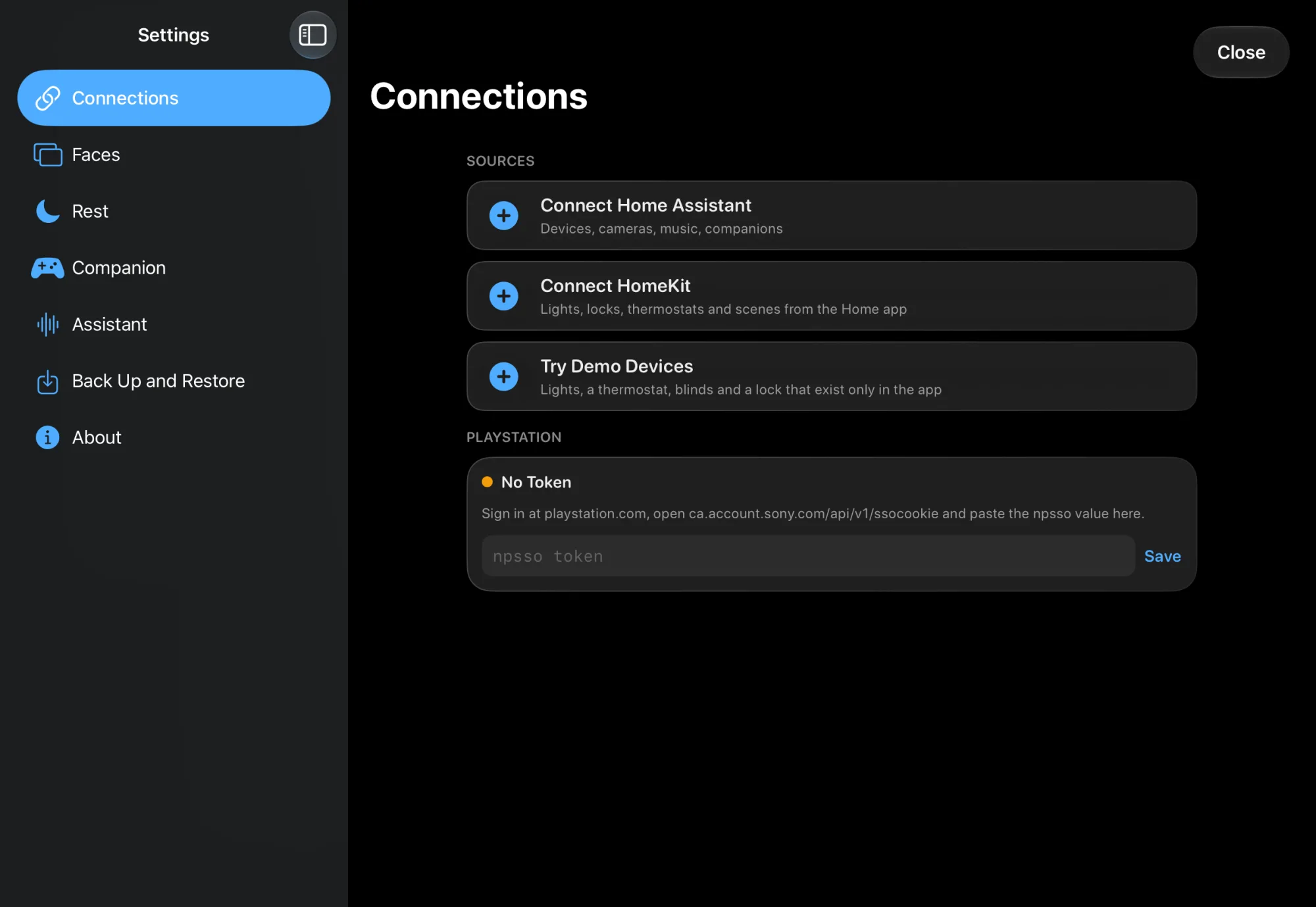
- Go to Settings › Connections.
- Paste the token in the PlayStation card, in the field npsso-token. If you paste the whole line from the browser, the app picks out the token itself.
- Tap Save.
- Go to Settings › Companion and check under PlayStation that Console power and Game Title are filled in. That happens by itself; otherwise tap Search Again for PlayStation Entities or pick them yourself.
- For buttons for blinds or a soundbar, tap PlayStation in the Companions list, then Customize Widgets, and add them as widgets; see Companions. Blinds are under Blinds, the soundbar under PlayStation. You choose what the soundbar widget controls in the widget itself.
Check
- The PlayStation card shows "Token set", or "Connected · " with your game.
- In Settings › Connections › What Works, PlayStation-companion has green checks.
- In Settings › Companion › PlayStation, Show Now shows the screen without turning on the PS5.
- Turn on the PS5. The companion appears; with ps5-mqtt right away, otherwise after about 30 seconds.
Not working?
The npsso token expired after about two months. Get a new one (see above) and paste it in the PlayStation card.
The token must be exactly 64 letters and digits. Copy it again.
Without ps5-mqtt, the PS5's state comes through the PlayStation cloud. Install ps5-mqtt to switch instantly.
The game title only comes from the PlayStation cloud, also when you use ps5-mqtt. Check that the PlayStation Network integration works.
Check the token in the PlayStation card. Trophy texts come in English; not every game reports progress steps ("37/500").
It only appears once Console power is filled in under Settings › Companion.